a request from "a yapper in my school"
This is a post looking at One Line Python Expressions again. My previous post talked about finding a list of primes in one line, but recently “a yapper in my school wanted me to make it better.” Specifically, it was pointed out that the algorithm I used was just modding stuff which is far inferior to the Sieve of Eratosthenes. I kind of talk about this Sieve of Eratosthenes in I Found Primes but I will still go over it again. Also, some people have informed me about more one line python techniques.
Sieve of Eratosthenes
This algorithm generates all primes up to some pre-specified parameter \(n\). First, you create a boolean list with size \(n-1\), where index \(i\) is false if \(i+2\) is prime and true otherwise. Then you loop over everything in the list, and check if it’s currently marked as false (0). If so, this is prime, and mark all multiples of this prime as true (composite). Then by looping over it again, we can convert the indices to numbers, giving us all the primes up to \(n\).
The One Line Python Expression
Here are my rules to this challenge:
- no semicolons
- no exec/eval
- no lambda
- nothing that feels wrong/is too good
Attempt this if you want to, ig.
My expression:
if (x:=0) + (n := 101) != "":[[(x:=(x | sum([1 << (p * y) for y in range(p, int(n/p)+1)]))) for p in range(2, n) if (x & (1 << p) == 0)] if i == 0 else print([j for j in range(2, n + 1) if (1 << j & x == 0)]) for i in range(2)]
It might be annoying to scroll, so here’s it outside of a code block:
if (x:=0) + (n := 101) != “”:[[(x:=(x | sum([1 « (p * y) for y in range(p, int(n/p)+1)]))) for p in range(2, n) if (x & (1 « p) == 0)] if i == 0 else print([j for j in range(2, n + 1) if (1 « j & x == 0)]) for i in range(2)]
This can be broken into a three parts: the first if statement, the logic, and the other stuff.
The if Statement
One of the main challenges in creating this is the need to access some type of data storage. In the mod algorithm one-liner, it was possible to just look at each number one at a time and mod that by everything to see if it’s a prime. But in the Sieve of Eratosthenes, each time we find a prime, we need to remove all of its multiples, which then helps us find the next prime. So we can’t just look at each number and check if it’s prime, we need to store the numbers for the next iteration of checking.
The problem with just assigning a variable is that this assignment is difficult to follow up with, unless a semicolon is used. Instead, I used the “assignment expression operator” :=, which people call the walrus operator. This acts as a regular = symbol, except it also returns the left side so you can use the value. For example, consider this code segment:
if (x := 0) == 0: ...
this sets x to 0 and then compares x to 0, which evaluates to true. Then the rest of the code would execute, and x would still be set to 0.
In my one-liner, I use
if (x:=0) + (n := 100) != "":
which sets x to 0 and n to 100, where n is the number to check up to. It then compares it to a string, which would let it pass if n is an integer. You could also replace the 100 with an input function.
The Logic
This is the logic bit:
[(x:=(x | sum([1 << (p * y) for y in range(p, int(n/p)+1)]))) for p in range(2, n) if (x & (1 << p) == 0)]
First, the outside brackets are for a list comprehension, where “for p in range(2, n)” loops \(p\) over everything from \(2\) to \(n - 1\). The if statement after that filters out all of the primes, however this will require more explanation.
The way that the primes are stored is with x practically as a binary array. The 0th bit represents the number 0, the 1st bit represents the number 1, and so on. If the bit is 0, then the number is prime, otherwise it’s not, except 0 and 1 are stuck at 0. You may have a concern that this will cause integer overflow, but Python actually has arbitrarily big integers.
The “x & (1 « p)” is really just selecting the \(p^{th}\) bit, as (1 « p) returns the number
\[100\cdots000\]where there are p zeros. Then when we bitwise and with x, we just get the pth bit of x, which represents p. Comparing this to \(0\) tells us whether we currently think it’s prime or not.
The inside of this loop over primes is:
(x:=(x | sum([1 << (p * y) for y in range(p, int(n/p)+1)])))
To understand this, I will first explain the interior list comprehension:
[1 << (p * y) for y in range(p, int(n/p)+1)]
This uses the same bit shifting thing as before, and this will give us a list of bits that correspond to the \(p * y^{th}\) numbers. Specifically, the range will give us everything from the \(p^{th}\) multiple of \(p\) up to the largest multiple of \(p\) under \(n\).
This slightly differs from the algorithm outlined above, where we mark all multiples of \(p\) as composite. This is just an optimization, because for all \(y * p\) where \(y<p\), \(y\) has a prime factor less than \(p\), which means that \(p*y\) would have already been marked.
This list comprehension is then summed. Because none of the bits in the list overlap, summing them is equivalent to stacking them all above each other. This gives us a single number where the \(i^{th}\) bit tells us whether to mark \(i\) as composite. The inside of the loop then reduces to:
(x:=(x | which bits to mark composite))
Here, we bitwise or x with the bits to mark true. Then we set x to this result and also return it. The reason we return it is that the list comprehension that is acting as the for loop wants values to put into the list that it is creating, even though we don’t really care about it. This completes the logic part of the expression, and thus x now has an integer representing all of the primes.
The Other Stuff
Now we have simplified the expression to:
(if statement): [(logic) if i == 0 else print([j for j in range(2, n + 1) if (1 << j & x == 0)]) for i in range(2)]
The rest of this is simpler to understand. The outside is just a list comprehension that runs exactly twice. Inside it is a one-line if statement:
(logic) if i == 0 else ...
So on the first iteration, the program runs the logic. On the second iteration, the program skips over the logic and instead executes
print([j for j in range(2, n + 1) if (1 << j & x == 0)])
which just converts the binary string x into a list of numbers, and then prints it (just for it to have the same output format as the previous one.)
Efficiency comparison
The original idea of this post was to make the mod algorithm more efficient. So did it actually accomplish this? Yes, it did.
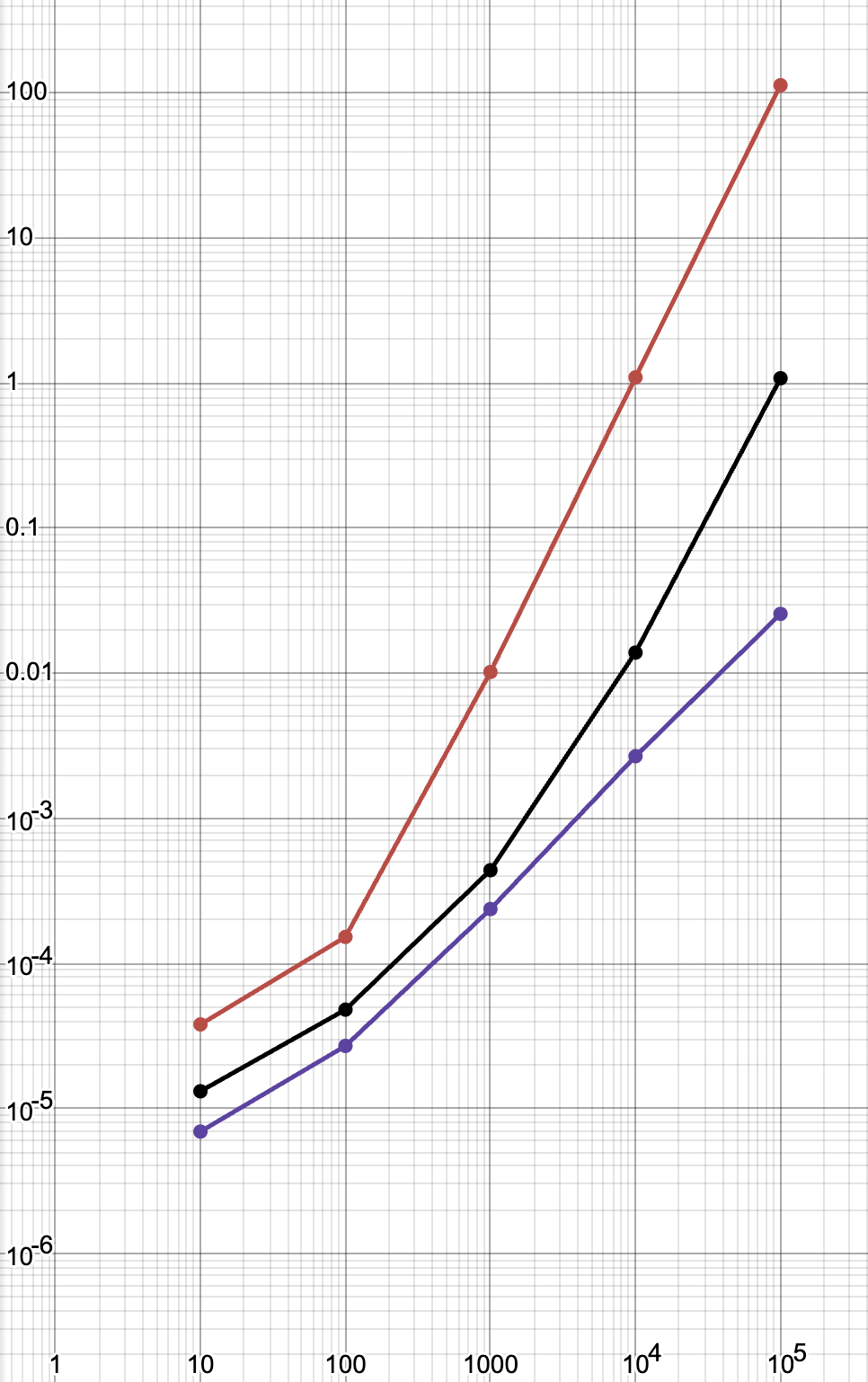
The red line is the one line mod algorithm, the black line is the one line Sieve of Eratosthenes algorithm, and the purple line is an implementation of the Sieve of Eratosthenes that I quickly programmed. It is very apparent that the new one liner is faster than the old one. However, something that I find suspicious is that the time for the new one liner seems to be curving upward. In my post on prime finding algorithms, The graphs all look mostly linear. I would guess this relates to the fact that I’m using an integer to store stuff instead of a list, but I don’t really know.
More Innovations
First, a few notes:
Above, we have seen how to create local variables using the walrus operator and an if statement at the start of the line, but if you are creating a variable in the middle of a line, you should probably switch to using the
(thing) if (var := (initial value))
variant of the if statement.
In my expression, I use a for loop and if statements to write “lines” of code. However, in my previous post on this topic, I mention that it could be possible to write “lines” using something like:
(line or (line2 or (line3 or ...)))
This could still work, however I like using for loops more because if the functions you call have a return value, then it might messs things up.
Next, some more techniques have been brought to my attention:
Classes can be defined using the type function. This follows the form:
a = type("name of class", (parents), {"var": value, "function": function})
The function, in our case, will probably be a lambda expression which takes in self as an argument.
To create an instance of this class, you need to write something along the lines of
instanceOfYourClass = a()
However, I’m not sure how to set instance variables with this, so I guess you could just create a buncha functions which just set the instance variables to things after you instantiate it. However, attempting to use self.var = value throws the error “SyntaxError: cannot use assignment expressions with attribute” which I don’t know how to prevent yet. I don’t think this is a problem, however, because we can pretty much create as many local variables as we want.
Both of these declarations are compatible with the walrus operator and if statement trick.
To define functions as you would regularly, you could create a class with the type function and then add all of the functions you want in the declaration. This could also replace all of the variable definitions if the assignment operator error gets circumvented.
Also, while loops can be compressed into one line just like if statements. Because for loops are really just while loops in disguise, I think it could be possible to just use while loops instead of list comprehension, which is probably more efficient.
Conclusion
In conclusion, one line python expressions can actually do way more things than I thought in the previous post. We can do assignment, if, for, while, functions, classes, and more, and I’m not sure, but I think this might be enough to replicate most programs without semicolons. However, there are still unknowns, such as the instance variables of classes or import statements. In the future, I might consider writing a program to convert an arbitrary python script into a one-line expression.